Strong field-to-office communication is one of the biggest difference-makers in contractor operations. When field crews and office teams are aligned, jobs move faster, customers get better updates, materials are easier to track, and fewer details fall through the cracks.
When communication is scattered across texts, calls, paper notes, spreadsheets, and memory, problems show up fast. Crews miss updates. Office staff lack real-time job status. Customers wait for answers. Change orders get delayed. Inventory issues are discovered too late. Scheduling becomes reactive instead of controlled.
For contractors, better communication is not just about talking more. It is about creating one clear system where job details, calendar updates, customer information, field notes, inventory, work management, CRM, and accounting data stay connected.
Quick Answer
Contractors can improve field-to-office communication by centralizing communication and technology, using a single source of truth, making tools mobile-accessible, connecting site management workflows, standardizing processes, setting channel rules, creating clear templates, analyzing communication gaps, and holding regular team syncs. These steps help reduce delays, improve job visibility, and keep office and field teams aligned.
Why Field-to-Office Communication Matters for Contractors
Field crews see what is happening on the job site. Office teams manage scheduling, customer updates, billing, inventory, documentation, and job coordination. If these two sides do not communicate clearly, the entire project can slow down.
Poor field-to-office communication can lead to:
- Missed job updates
- Delayed customer responses
- Incorrect scheduling
- Lost field notes
- Unapproved change orders
- Inventory shortages
- Billing mistakes
- Duplicate data entry
- Confused crews
- Frustrated customers
- Lower job profitability
Good communication keeps everyone working from the same information. No more “Wait, who approved that?” chaos. That question is basically the contractor version of a jump scare.
Centralize Field and Office Communication in One System
The first step is to centralize communication and tech. Contractors should avoid relying on too many disconnected tools because scattered communication creates confusion.
If job updates are split between phone calls, texts, emails, spreadsheets, paper forms, and group chats, the office may not know which information is current.
A centralized system helps teams manage:
- Job updates
- Customer notes
- Crew assignments
- Photos
- Documents
- Change orders
- Inventory needs
- Scheduling updates
- Invoices
- Work orders
- Job progress
Centralized communication gives both the field and office one place to check before making decisions.
Use a Single Source of Truth for Job Information
A single source of truth means everyone uses the same system for job information. This prevents duplicate records, outdated updates, and conflicting instructions.
A strong single source of truth may include:
- Customer details in the CRM
- Job schedules in the calendar
- Work orders in the work management system
- Inventory usage records
- Job notes and photos
- Change order history
- Billing and accounting updates
- Crew assignments
- Project status
When the office updates a job, the field should see it. When the field adds notes or photos, the office should see them too.
This keeps information from getting trapped in one person’s phone, inbox, or notebook.
Make Communication Tools Mobile-Accessible for Field Crews
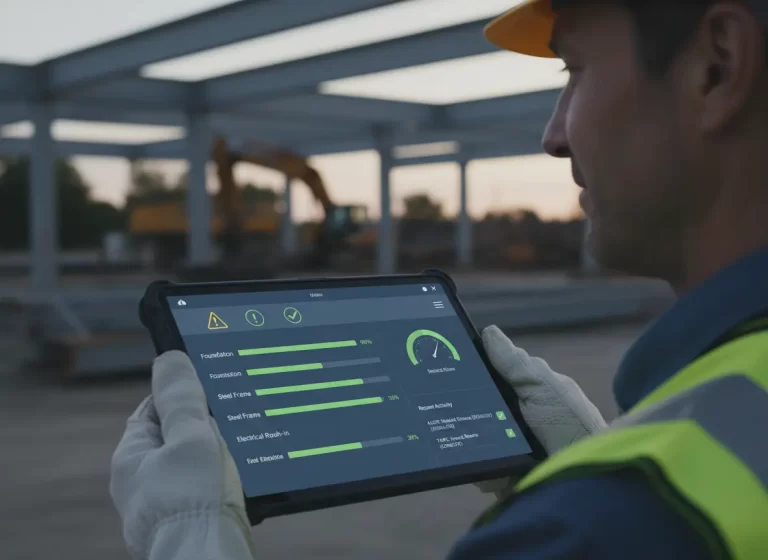
Field teams need tools they can use from the job site. If the system only works well on an office desktop, field communication will always lag behind.
Mobile-accessible tools allow crews to update job information in real time.
Field crews should be able to:
- View assigned jobs
- Check schedules
- Add job notes
- Upload photos
- Update job status
- Request materials
- Record time
- Submit expenses
- Capture customer approvals
- Complete forms
- Review work order details
Mobile access reduces the need for back-and-forth calls. The office gets faster updates, and crews spend less time repeating information.
Connect Site Management Workflows With Office Operations
Site management should connect directly to the office workflow. A job site update should not sit in isolation. It should trigger the next step for scheduling, inventory, accounting, or customer communication.
For example:
- A crew marks a job delayed
- The office updates the calendar
- Inventory is checked for missing materials
- The customer receives an update
- The project manager reviews the impact
- Accounting adjusts billing if needed
This kind of connected workflow helps prevent delays from turning into bigger problems.
Contractors should connect field updates with:
- Work orders
- Crew scheduling
- Inventory tracking
- Customer communication
- Change orders
- Accounting
- Project reporting
- Job profitability tracking
When site management is connected, the office does not have to chase every update manually.
Standardize Communication Processes and Expectations
Standardized processes help both office and field teams understand what needs to happen, when it needs to happen, and where the information should go.
Without standard processes, every crew may communicate differently. One technician sends photos by text. Another leaves notes on paper. Another calls the office at the end of the day. Another forgets entirely.
That creates messy data and inconsistent job records.
Contractors should standardize:
- How job status updates are submitted
- When crews must send updates
- What photos are required
- How change orders are requested
- How material issues are reported
- How customer concerns are documented
- How time and expenses are logged
- How completed work is confirmed
Clear expectations reduce confusion and make communication easier to manage.
Set Channel Standards for Contractor Communication
Set channel standards so everyone knows which communication tool to use for each type of update.
For example:
| Communication Type | Best Channel |
| Urgent safety issue | Phone call |
| Job status update | Work management app |
| Customer notes | CRM |
| Schedule change | Calendar or dispatch system |
| Material request | Inventory system |
| Change order request | Work order or project system |
| Billing question | Accounting system |
| Photos and site notes | Job record |
This prevents important updates from getting buried in random texts or group chats.
A simple rule helps: if the update affects the job record, customer, schedule, materials, or billing, it should go into the system, not just a message thread.
Create Clear Field Update Templates
Templates help field crews send complete updates without typing long reports every time.
Useful templates may include:
- Daily job update template
- Job completion checklist
- Material request form
- Change order request form
- Customer issue report
- Site photo checklist
- Delay report
- Safety concern form
- Final walkthrough checklist
A good field update template may ask for:
- Job name
- Crew member
- Date
- Work completed
- Materials used
- Issues found
- Photos uploaded
- Customer notes
- Next steps
- Time spent
- Follow-up needed
Templates make updates faster, cleaner, and easier for the office to act on.
Analyze Field-to-Office Communication Gaps
Contractors should regularly analyze communication gaps to find where breakdowns happen.
Common communication gaps include:
- Crews not updating job status
- Office staff not notifying customers
- Material requests sent too late
- Change orders missing approval
- Photos not uploaded
- Time entries submitted late
- Schedule changes not shared with crews
- Accounting missing job cost details
- CRM notes not updated after customer calls
To find these gaps, review recent jobs and ask:
- Where did information get delayed?
- What update was missing?
- Who needed the information?
- Which system should have captured it?
- Did the issue affect the schedule, cost, or customer?
- What process would prevent it next time?
This turns communication issues into process improvements instead of repeat headaches.
Strengthen Alignment Between Field Crews and Office Teams
Technology helps, but communication still depends on people. Field and office teams need trust, respect, and shared expectations.
If field crews feel the office does not understand job site realities, they may stop giving detailed updates. If office staff feel field crews ignore processes, frustration builds.
Better alignment helps both sides understand why communication matters.
Office teams need field updates to:
- Keep customers informed
- Adjust schedules
- Order materials
- Prepare invoices
- Track job profitability
- Manage work orders
- Close jobs accurately
Field teams need office support to:
- Get clear job details
- Avoid unnecessary callbacks
- Receive materials on time
- Reduce customer confusion
- Stay on schedule
- Focus on quality work
When both sides understand the impact, communication improves naturally.
Hold Regular Team Syncs to Review Jobs and Blockers
Regular syncs help contractors catch issues before they become bigger problems.
These meetings do not need to be long. The goal is to review active jobs, blockers, schedule changes, material issues, and customer updates.
Useful syncs may include:
- Daily dispatch check-in
- Weekly project review
- End-of-day field update
- Job closeout review
- Material planning meeting
- Schedule gap review
- Crew feedback session
A strong sync should answer:
- Which jobs are on track?
- Which jobs are delayed?
- What materials are missing?
- Which customers need updates?
- What change orders need approval?
- What schedule gaps are coming?
- What needs office support?
Regular syncs keep communication proactive instead of reactive.
Encourage Face-to-Face Time Between Office and Field Teams
Face-to-face time helps build trust between field and office teams. Even with strong software, real conversations still matter.
Contractors can encourage face-to-face alignment through:
- Weekly crew meetings
- Project kickoff meetings
- Post-job reviews
- Office and field ride-alongs
- Training sessions
- Process feedback meetings
- Team lunches or informal check-ins
These conversations help the office understand field challenges and help field crews understand why documentation, schedules, CRM notes, inventory updates, and accounting details matter.
Better relationships create better communication. Fancy software cannot fix a team that secretly wants to throw each other into the drywall.
How Contractor Software Supports Better Field-to-Office Communication
Contractor management software can make communication easier by connecting field and office data in one place.
Helpful features include:
- CRM
- Calendar scheduling
- Work management dashboards
- Mobile work orders
- Job status updates
- Inventory tracking
- Time tracking
- Photo uploads
- Change order management
- Customer communication history
- Accounting integration
- WIP and job profitability reports
When these systems work together, contractors reduce duplicate data entry and improve job visibility from first contact to final invoice.
Final Thoughts: Keep Field and Office Teams Aligned
Contractors can improve field-to-office communication by centralizing communication, using one source of truth, making tools mobile-accessible, and connecting site management workflows with scheduling, CRM, inventory, HR, work management, and accounting systems.
Standardized processes, clear channel rules, templates, regular syncs, and communication gap reviews help teams stay aligned and reduce costly delays.
When field crews and office teams share accurate information in real time, contractors can improve job flow, protect profitability, reduce mistakes, and deliver a smoother customer experience.