For contractors, finishing the job is only half the battle. The business still needs to confirm the work, collect field notes, check materials, attach proof, generate the invoice, send it to the customer, and collect payment.
When that process takes too long, cash flow suffers.
Many contractors complete work quickly but invoice slowly because the field-to-office handoff is messy. Photos stay on a technician’s phone. Labor hours are submitted late. Material usage is missing. Customer approval is not documented. The office waits for confirmation before billing. Days pass, and the invoice still has not gone out.
That delay creates billing lag and cash-flow drag.
Contractors can reduce the time between job completion and invoicing by improving field-to-office communication, using mobile apps, syncing data in real time, collecting digital sign-offs, automating the billing workflow, and setting clear billing policies upfront. With connected CRM, Work Management, Inventory, Accounting, Calendar, and HR tools, contractors can move from completed jobs to sending invoices much faster.
Quick Answer
Contractors can reduce the time between job completion and invoicing by streamlining field-to-office communication, using mobile apps, syncing job data in real time, collecting digital sign-offs, automating invoice generation, using standard billing templates, attaching proof upfront, defining billing triggers, and offering digital payments. A connected platform like MBP helps contractors link Work Management, Inventory, Accounting, CRM, Calendar, and HR tools so completed jobs can move into invoicing with fewer delays.
Why Invoicing Gets Delayed After Job Completion
Invoicing delays usually happen because the office does not have everything it needs to bill confidently. The job may be physically done, but the records are incomplete.
The office may still need:
- Labor hours
- Materials used
- Job photos
- Customer approval
- Completion notes
- Change order details
- Delivery tickets
- Signed work order
- Payment terms
- Final pricing confirmation
- Warranty notes
- Job status update
If these details are missing, the invoice waits.
That waiting period is expensive. The longer the delay between completion and invoicing, the longer it takes to collect payment. For small contractors, even a few days of billing delay can affect payroll, material purchasing, vendor payments, and operating cash.
The Cost of Billing Lag
Billing lag creates more than a payment delay. It affects the whole operation.
When invoices are not sent quickly, contractors may deal with:
- Slower cash flow
- More unpaid work sitting in the system
- Delayed payment collection
- More admin follow-ups
- Customer confusion
- Disputed charges
- Missing job documentation
- Inaccurate job costing
- Weak accounting visibility
- More pressure on the owner or office team
The job should not disappear into admin limbo after field crews leave the site. Once the work is complete, the billing process should move immediately.
Improve Field-to-Office Communication for Faster Invoicing
Streamline Field-to-Office Communication so the office receives complete job information as soon as the work is done. This is the first step to faster invoicing.
Field crews should not need to send job updates through random text messages, paper notes, phone calls, and photo dumps. That creates handoff friction because the office has to collect and organize information manually.
A better process gives field workers a clear closeout workflow.
Field-to-office communication should include:
- Job completion status
- Work performed
- Labor hours
- Materials used
- Photos or videos
- Customer approval
- Change order notes
- Safety issues
- Follow-up needs
- Invoice readiness
This information should go directly into Work Management and Accounting systems, not sit in someone’s inbox.
Use Mobile Apps to Submit Job Completion Details
Use mobile apps so technicians can submit job information from the field before leaving the site. Mobile access helps reduce delays because field workers can update the job while the details are still fresh.
A good contractor mobile app should allow field crews to:
- Mark jobs complete
- Add notes
- Upload photos
- Record labor hours
- Log materials
- Capture customer signatures
- Attach receipts
- Submit forms
- Flag issues
- Trigger invoice review
Mobile apps are especially important for contractors with multiple crews or job sites. Without mobile updates, the office may not know a job is complete until much later.
If the field team can complete the closeout from their phone, the office can start billing faster.
Sync Job Data in Real Time Between Field and Office
Real-time syncing helps job updates move from the field to the office immediately. This prevents the office from waiting for end-of-day reports, paper forms, or manual updates.
When real-time syncing is in place, the office can see:
- Job completion status
- Uploaded photos
- Materials used
- Labor entries
- Customer sign-offs
- Change order details
- Invoice-ready jobs
- Follow-up tasks
This helps managers and accounting staff act faster.
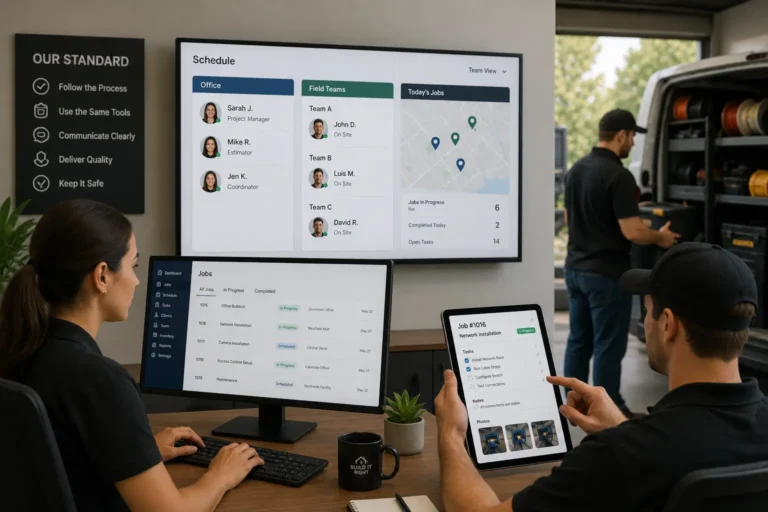
Real-time syncing works best when CRM, Work Management, Inventory, Accounting, Calendar, and HR tools are connected. For example, once a technician marks a job complete, the job status updates in Work Management, the invoice draft begins in Accounting, the customer record updates in CRM, and the Calendar reflects the completed appointment.
That is how contractors reduce billing delays without adding more admin work.
Collect Digital Sign-Offs Before Sending Invoices
Digital sign-offs help contractors confirm job completion before invoicing. Instead of waiting for a paper signature or verbal approval, field workers can collect confirmation from the customer or manager on a mobile device.
Digital sign-offs can be used for:
- Completed work approval
- Customer acceptance
- Change orders
- Added materials
- Extra labor
- Partial completion
- Warranty acknowledgment
- Final inspection
- Site condition confirmation
This gives the office stronger proof before sending the invoice.
Digital sign-offs also reduce disputes because the customer has already confirmed the work or approved the change. That makes invoicing faster and cleaner.
Automate the Billing Workflow After Job Completion
Automate the Billing Workflow so completed jobs can move into invoicing without manual rebuilding. If the office has to recreate every invoice from scratch, billing will always be slow.
Automation can help turn job data into invoice-ready records.
A billing workflow may look like this:
| Step | System Action | Business Benefit |
| Job marked complete | Work Management updates status | Office knows the job is ready for review |
| Materials logged | Inventory updates usage | Material costs are connected to the job |
| Hours submitted | HR and Accounting receive labor data | Labor costs are recorded accurately |
| Customer signs off | Approval attaches to job record | Invoice has proof upfront |
| Invoice draft generated | Accounting prepares billing details | Office saves manual entry time |
| Invoice reviewed | Admin checks final details | Errors are caught before sending |
| Invoice sent | Customer receives bill and payment link | Payment process starts faster |
Automation does not remove the need for review. It removes the repetitive work that slows review down.
Auto-Generate Invoices From Completed Work Orders
Auto-generate invoices from completed work orders, approved estimates, logged hours, material usage, and change orders. This helps contractors avoid starting every invoice manually.
Auto-generated invoices can include:
- Customer information
- Job address
- Work order details
- Approved estimate items
- Labor charges
- Materials used
- Change orders
- Taxes
- Payment terms
- Discounts if applicable
- Photos or attachments
- Due date
- Payment link
This helps accounting staff review and send invoices faster.
The key is accuracy. Auto-generated invoices should pull from clean job data. If the field team does not submit complete information, the invoice may still need manual cleanup.
Use Standard Invoice Templates to Reduce Billing Errors
Use standard templates to keep invoices consistent, professional, and fast to prepare. Contractors should not rewrite invoice language every time a job is completed.
Standard templates can include:
- Service descriptions
- Labor line items
- Material line items
- Terms and conditions
- Warranty notes
- Payment instructions
- Late payment language
- Deposit references
- Project phase billing
- Maintenance service billing
Templates reduce errors and help customers understand what they are paying for.
They also make billing easier for office staff, especially when multiple people create invoices.
Attach Proof Upfront to Reduce Invoice Disputes
Attach proof upfront so customers can review the invoice without asking for more information. This helps reduce disputes and payment delays.
Proof may include:
- Completion photos
- Before-and-after photos
- Signed work orders
- Digital approvals
- Material receipts
- Delivery tickets
- Change order approvals
- Technician notes
- Inspection records
- Customer sign-offs
When proof is attached before the customer asks, the invoice looks more complete and credible.
This is especially useful for contractors that bill for repair work, field service, change orders, materials, or labor-heavy jobs.
Set Clear Billing Policies Before Work Begins
Set Clear Policies Upfront so customers know when billing happens, what triggers an invoice, and how payment should be made. Clear policies reduce confusion and help contractors bill faster.
Customers should understand:
- When invoices are sent
- What counts as job completion
- Whether deposits are required
- When payment is due
- What payment methods are accepted
- How change orders are billed
- Whether partial billing applies
- What happens with overdue payments
- Who approves added work
These policies should be documented in the estimate, proposal, service agreement, or customer onboarding process.
Clear billing policies also help the office avoid awkward payment conversations later.
Define Billing Triggers for Completed Jobs
Define billing triggers so the team knows exactly when an invoice should be created. Without billing triggers, jobs may sit in a completed status while the office waits for someone to confirm the next step.
Billing triggers can include:
- Technician marks job complete
- Customer signs completion form
- Manager approves work order
- Materials are confirmed
- Final photos are uploaded
- Change orders are approved
- Project phase is completed
- Delivery or installation is finished
- Maintenance visit is closed
- Service report is submitted
Once the trigger happens, the system should notify the office or create an invoice draft automatically.
This keeps billing from depending on memory.
Offer Digital Payments to Improve Cash Flow
Offer digital payments so customers can pay as soon as they receive the invoice. Sending invoices faster is useful, but payment collection also needs to be easy.
Digital payment options may include:
- Payment links
- Card payments
- ACH payments
- Online portals
- Mobile payments
- Deposits
- Partial payments
- Recurring payments
- Saved payment methods
Digital payments reduce friction for customers and help contractors collect faster.
When payment tools connect with Accounting and CRM, the business can track invoice status, payment history, and follow-up needs in one place.
Contractor Invoice Speed Checklist
| Area | What to Improve | Why It Helps |
| Field communication | Submit job details from the site | Reduces office follow-up |
| Mobile apps | Let technicians update work orders | Speeds up closeout |
| Real-time syncing | Send field updates instantly | Helps office act sooner |
| Digital sign-offs | Capture approvals before leaving | Reduces disputes |
| Billing automation | Create invoice drafts from job data | Saves admin time |
| Invoice templates | Standardize billing language | Reduces errors |
| Proof attachments | Add photos and approvals upfront | Supports faster payment |
| Billing triggers | Define when invoicing starts | Prevents completed jobs from sitting |
| Digital payments | Offer easy online payment options | Improves cash flow |
How Connected Business Tools Help Contractors Invoice Faster
Reducing the time between job completion and invoicing requires connected systems.
CRM stores customer records, job history, communication, follow-ups, and payment-related notes.
Work Management tracks job status, work orders, field updates, closeout forms, and completion details.
Inventory records materials used, stock changes, delivery tickets, and job-related supplies.
Accounting creates invoices, tracks payments, manages expenses, and supports job costing.
Calendar shows job timing, completion schedules, appointment history, and follow-up dates.
HR supports labor tracking, employee assignments, timesheets, and crew records.
When these systems work together, the invoice does not have to be rebuilt manually. The information flows from job completion to billing faster.
How MBP Helps Contractors Reduce Invoicing Delays
My Business Portal helps contractors reduce billing lag by connecting CRM, Work Management, Inventory, Accounting, Calendar, HR, documents, tasks, and reporting in one platform.
MBP can help contractors:
- Track job completion status
- Collect field updates through Work Management
- Store customer details in CRM
- Record labor and crew information
- Track materials through Inventory
- Keep schedules connected through Calendar
- Attach photos, approvals, and documents
- Support invoice readiness through Accounting
- Reduce manual handoffs between field and office
- Improve visibility into completed but uninvoiced jobs
- Keep payment follow-ups organized
With MBP, contractors can move from completed work to invoice-ready records faster, with less chasing and fewer missing details.
Final Thoughts: Reduce Billing Lag and Improve Contractor Cash Flow
Contractors can reduce the time between job completion and invoicing by fixing the handoff between the field and the office. The faster the office receives complete job data, the faster the business can bill.
Mobile apps, real-time syncing, digital sign-offs, invoice automation, standard templates, proof attachments, clear billing policies, defined billing triggers, and digital payments all help shorten the gap between finished work and paid work.
In 2026, contractors should not let completed jobs sit in admin limbo. With connected CRM, Work Management, Inventory, Accounting, Calendar, and HR tools, MBP helps contractors reduce billing delays, improve cash flow, and keep the business moving.
Contractor Invoicing FAQs
How can contractors invoice faster after job completion?
Contractors can invoice faster by using mobile field updates, real-time syncing, digital sign-offs, automated invoice generation, standard templates, proof attachments, and clear billing triggers.
Why do invoices get delayed after jobs are completed?
Invoices get delayed when the office is missing labor hours, material usage, photos, approvals, change order notes, or final job status. Without complete field information, billing has to wait.
How do mobile apps help with contractor invoicing?
Mobile apps let field crews update work orders, upload photos, log materials, submit hours, and collect signatures from the job site. This gives the office the information needed to invoice sooner.
What are billing triggers?
Billing triggers are defined events that start the invoicing process, such as job completion, customer sign-off, manager approval, uploaded photos, or confirmed materials.
Why should contractors attach proof to invoices?
Attaching proof such as photos, signed work orders, approvals, delivery tickets, and change orders helps customers understand the invoice and reduces disputes.
How does MBP help reduce invoicing delays?
MBP helps contractors connect CRM, Work Management, Inventory, Accounting, Calendar, HR, documents, and field updates so completed jobs can move into invoicing faster.