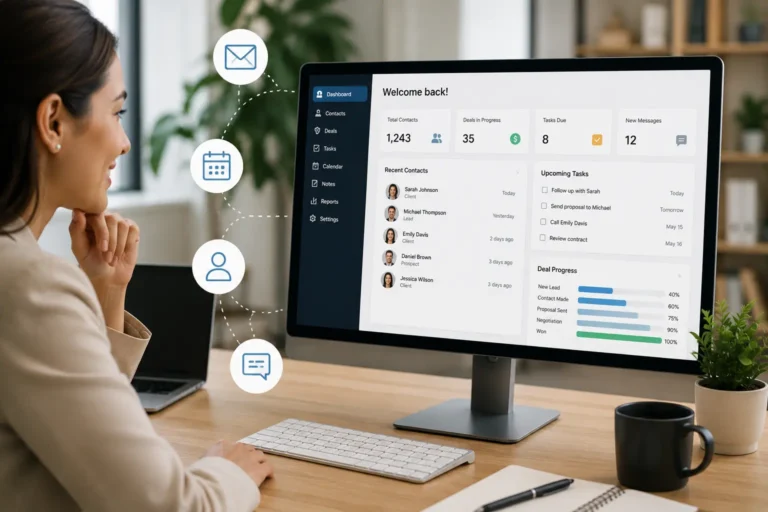
When work slows down, most contractors assume they need more leads. The default reaction is to spend more on ads, lead services, or marketing campaigns. But for many businesses, the real issue is not lead volume. It is lead follow-through.
Leads come in, quotes get sent, and then communication stalls. Follow-ups are forgotten. Opportunities fade out quietly. Without a system to manage leads, even strong demand turns into missed revenue.
In this guide, we explain how contractor CRM software helps you close more jobs without increasing your marketing budget. By organizing leads, tracking follow-ups, and keeping your sales pipeline active, a CRM turns existing inquiries into booked work using MyBusinessPortal.Cloud.
Quick Answer: How does contractor CRM help close more jobs?
Contractor CRM helps close more jobs by organizing leads, tracking quotes, storing customer notes, assigning follow-ups, and showing which opportunities need attention. Instead of losing inquiries in texts, emails, paper notes, or memory, contractors can use CRM software to keep every lead visible from first contact to booked job.
Lead Follow-Up Problems and CRM Fixes
| Lead Follow-Up Problem | How It Costs Contractors Jobs | CRM Fix |
|---|---|---|
| New leads are not logged | Inquiries get forgotten after calls, texts, or emails. | Store every lead in one CRM pipeline. |
| Quotes are not tracked | Estimates are sent but no one knows the next step. | Track quote status as sent, pending, approved, or lost. |
| Follow-ups depend on memory | Prospects go cold before anyone checks back. | Set reminders for calls, emails, and quote follow-ups. |
| Customer notes are scattered | Staff miss important context during conversations. | Keep notes, preferences, and job details in one customer record. |
| No lead owner is assigned | Team members assume someone else is following up. | Assign each lead to a responsible person. |
| Sales pipeline is unclear | Managers cannot see which opportunities are close to booking. | View active, stalled, won, and lost opportunities. |
| Past customers are forgotten | Repeat work and referrals get missed. | Use CRM history to follow up with previous customers. |
Why Contractors Lose Leads Without a CRM
You get a call, send a quote, and then… nothing.
No follow-up. No next step. No job booked.
This happens far too often, especially when there’s no system in place to manage leads. Paper notes, scattered texts, and a cluttered inbox are not enough when you’re juggling multiple jobs and clients.
How CRM Keeps Leads Moving Forward
A CRM (Customer Relationship Management tool) acts like a digital memory for your business. It keeps track of every inquiry, every quote sent, and every potential job so nothing slips through the cracks.
You can:
- See all open leads at a glance
- Set reminders to follow up
- Track communication history
- Assign leads to team members
- Prioritize quotes that are close to closing
It removes the guesswork and keeps your sales process moving forward.
How CRM Keeps Leads Moving From Inquiry to Booked Job
A contractor CRM helps turn lead management into a clear process. Every inquiry should have a status, owner, next step, and follow-up date. Without those details, leads stay open without moving closer to a booked job.
| Lead Stage | What CRM Tracks | Why It Helps |
|---|---|---|
| New inquiry | Contact details, service need, location, and source. | Makes sure the lead is captured before it is forgotten. |
| Qualification | Job type, budget, urgency, and fit. | Helps the team focus on real opportunities. |
| Quote sent | Estimate details, date sent, and follow-up date. | Prevents quotes from sitting without action. |
| Follow-up needed | Reminder, message history, and assigned owner. | Keeps communication timely and organized. |
| Ready to book | Approved quote, preferred schedule, and customer notes. | Helps move the lead into the calendar faster. |
| Won job | Job details, schedule, and customer record. | Connects sales activity to actual work. |
| Lost lead | Reason lost and notes for future improvement. | Helps the business learn where leads drop off. |
How CRM Makes Follow-Ups Easy
A CRM helps you follow up in a way that’s helpful, not aggressive.
Instead of guessing when to reach out, you’ll have reminders built into your workflow. You’ll know who’s due for a check-in and what stage they’re at in the process.
That makes it easier to send messages like:
- “Just checking if you had questions about the quote”
- “We have availability this Thursday if you’d like to book”
- “Let us know if you’d like us to rework the estimate”
It’s professional, timely, and customer-focused.
CRM Features That Help Contractors Close More Jobs
Contractors close more jobs when they can see which leads need action and which quotes are close to approval. CRM software helps turn scattered communication into a repeatable sales workflow.
| CRM Feature | How It Helps Close More Jobs |
|---|---|
| Lead pipeline | Shows where every opportunity stands. |
| Quote tracking | Helps teams follow up on estimates before they go cold. |
| Follow-up reminders | Prevents missed calls, emails, and check-ins. |
| Customer notes | Gives staff context before each conversation. |
| Lead ownership | Makes responsibility clear for each opportunity. |
| Communication history | Keeps past calls, messages, and decisions visible. |
| Customer history | Helps contractors win repeat work from past clients. |
| Reporting | Shows where leads are won, lost, or delayed. |
How CRM Increases Job Conversions
When you follow up consistently, jobs that were sitting in limbo start moving. You’ll convert more of your existing leads and get more value out of every dollar you already spent to generate them.
This is how you grow without adding more to your budget.
Close More Jobs With a Contractor CRM
MBP CRM helps contractors organize leads, track quotes, assign follow-ups, store customer notes, and keep every opportunity moving from inquiry to booked job.
If your team is losing jobs because leads are scattered across texts, emails, calls, or memory, MBP gives you a cleaner way to manage sales follow-through.
Explore MBP CRMConvert More Leads Into Booked Jobs
You don’t always need more leads. Sometimes, you just need to work smarter with the ones you already have.
At MyBusinessPortal.cloud, our CRM helps contractors stay on top of every lead and follow-up opportunity. When paired with our HR, calendar and work management tools, it creates a simple system that keeps your sales process active, organized, and efficient.
A stronger CRM workflow works best when customer records connect with scheduling, daily work, and billing. MBP helps contractors connect CRM with team scheduling, work management, and accounting so leads, quotes, jobs, and invoices stay organized from first contact to completed work.
CRM for Contractors FAQs
How does CRM software help contractors close more jobs?
CRM software helps contractors close more jobs by tracking every lead and ensuring consistent follow-ups. It keeps your pipeline organized so no opportunity gets forgotten. This increases your chances of converting existing inquiries into booked work.
Why do contractors lose leads without a CRM?
Contractors lose leads when follow-ups are missed or communication is not tracked. Without a system, leads get buried in texts, emails, or memory. Over time, this leads to lost jobs and wasted marketing efforts.
Can a CRM reduce the need for more marketing spend?
Yes, a CRM helps you get more value from the leads you already have. By improving follow-ups and tracking, you convert more inquiries into paying jobs. This reduces the need to spend more on ads or lead generation.
How does CRM improve follow-ups with clients?
A CRM sets reminders and tracks where each lead is in the process. This helps you follow up at the right time with the right message. It makes communication consistent and more professional.
What CRM features help contractors close more jobs?
The most useful CRM features for contractors include lead tracking, quote tracking, follow-up reminders, customer notes, lead ownership, communication history, and sales pipeline visibility. These features help teams know which opportunities need attention before they are lost.
When should contractors start using CRM software?
Contractors should start using CRM software when leads are missed, quotes are hard to track, customer notes are scattered, or follow-ups depend on memory. A CRM helps organize every opportunity so more inquiries can turn into booked jobs.