What is quote-to-completion job management?
Quote-to-completion job management is the process of handling every stage of a service job — from the initial customer estimate through scheduling, work execution, and final invoice — within a single connected system. For contractors and tradesmen, managing this workflow in one platform eliminates missed details, scheduling gaps, and delayed billing that commonly occur when each stage is handled through separate tools or manual processes.
Getting a job done isn’t just about showing up and doing the work. It’s about what happens before, during, and after each project starting from the first quote to the final payment.
If you’re a contractor, tradesman, or small business owner, you know how fast things can fall apart without a system. One missed detail in the quote, a scheduling miscommunication, or a delayed follow-up can turn a straightforward job into a stressful one.
The good news? There’s a smarter way to manage jobs from start to finish.
Why Field Service Businesses Lose Money Without a Job Management System
For contractors and service companies, every job follows a similar lifecycle. A customer requests a quote, the work is scheduled, the team completes the job, and the business sends an invoice.
When these steps are managed through separate tools or manual processes, problems quickly appear. Quotes get lost, schedules change without updates, and invoicing gets delayed.
A structured quote-to-completion system connects every stage of the job in one workflow, helping businesses stay organized and deliver consistent service.
What Is Job Management Software?
Job management software is a digital platform that helps businesses track projects from the first customer quote through scheduling, work execution, and final invoicing. Contractors use these systems to organize tasks, manage teams, monitor job progress, and keep client information in one place.
Job Management Software vs. Project Management Software: What’s the Difference?
These two categories are frequently confused, but they serve fundamentally different workflows. Using the wrong one for a trade or field service business creates gaps that cost time and money.
General Project Management Tools: Built for Offices, Not Job Sites
General project management tools such as Asana, Monday.com, and Trello are designed for knowledge workers managing tasks, deadlines, and team collaboration. They handle to-do lists, file sharing, and milestone tracking well. What they do not handle is the operational reality of a field service business — quoting, crew scheduling, job site tracking, client invoicing, and payment collection are either absent or require significant customization to approximate.
Best for: Office-based teams managing internal projects, marketing campaigns, or software development workflows.
Job Management Software: Purpose-Built for Contractors and Field Teams
Job management software is built specifically for contractors, tradesmen, and field service businesses. It connects the full lifecycle of a service job — quote, schedule, assign, execute, invoice, collect — in a single platform. Every feature is designed around how field teams actually work: mobile access on job sites, real-time schedule visibility, automatic invoice generation from completed job details, and client communication tied directly to specific jobs.
Best for: Contractors, tradesmen, and field service businesses that need to manage crews, job sites, and client billing simultaneously.
How MyBusinessPortal.Cloud Handles the Full Job Lifecycle
MyBusinessPortal.cloud is purpose-built job management software for contractors and small field service teams. Unlike general project management tools that require workarounds for quoting and invoicing, MyBusinessPortal.cloud connects every stage of the job lifecycle in one place — from the first estimate through scheduling, work execution, and final payment. It also integrates with CRM, HR, and scheduling so that job data does not have to be re-entered across multiple platforms.
| General project management | Job management software | MyBusinessPortal.cloud | |
|---|---|---|---|
| Quoting and estimates | No | Yes | Yes |
| Crew scheduling | Limited | Yes | Yes |
| Job site tracking | No | Yes | Yes |
| Auto-invoicing from job details | No | Yes | Yes |
| CRM integration | Limited | Varies | Yes |
| HR and team management | No | Varies | Yes |
| Built for field teams | No | Yes | Yes |
| Mobile access on job sites | Limited | Yes | Yes |
The core distinction is intent. General project management software was designed for office environments and adapted for field use. Job management software was designed for field environments from the ground up. For contractors managing multiple crews, job sites, and clients simultaneously, the difference in day-to-day efficiency is significant.
Step 1: Create Fast, Accurate Job Quotes That Win More Work
A solid job starts with a clear, professional quote. But if you’re still typing them out manually or copying an old template in Word, you’re probably wasting time and leaving room for errors.
Smart job management tools allow you to:
- Generate accurate quotes quickly
- Include all labor, material, and tax breakdowns
- Save and reuse templates for similar projects
- Send quotes digitally for faster client approval
The faster you quote, the sooner you win the job and the more professional you look while doing it.
Step 2: Schedule Jobs and Assign Crews Instantly After Approval
Once a quote is approved, things need to move quickly. That’s where scheduling and task assignment come into play.
With job management software, you can:
- Instantly convert a quote into a scheduled job
- Assign specific team members to the task
- Set timelines and deadlines
- Notify your crew and keep everyone in the loop
No more juggling sticky notes or phone calls. Everyone knows where to be, when to be there, and what needs to be done.
Step 3: Track Job Progress in Real Time and Keep Clients Updated
During the job, things move fast and changes happen. Maybe the scope shifts. Maybe the client requests an add-on. Maybe there’s a delay with materials.
A smart system gives you real-time updates, so you can:
- Adjust timelines as needed
- Log updates and notes
- Track progress against schedule
- Communicate directly with your client from the platform
Transparency builds trust. When your client knows what’s happening, they feel more in control and they’re more likely to refer you or hire you again.
Step 4: Auto-Generate Invoices and Get Paid Faster After Job Completion
When the job’s done, it’s time to get paid. But too many businesses delay billing because they’re buried in paperwork.
A complete job management system lets you:
- Auto-generate invoices from job details
- Add any additional charges or changes
- Send invoices instantly, no extra admin work
- Accept payments faster and track what’s still owed
That means smoother cash flow, fewer missed payments, and less stress chasing down money after the fact.
Key Benefits of Job Management Software for Contractors
Contractors who use job management systems gain several operational advantages.
• faster quote generation
• better scheduling visibility
• improved team coordination
• real-time job tracking
• faster invoicing and payments
• fewer administrative errors
These systems help service businesses operate more efficiently and scale operations with less manual work.
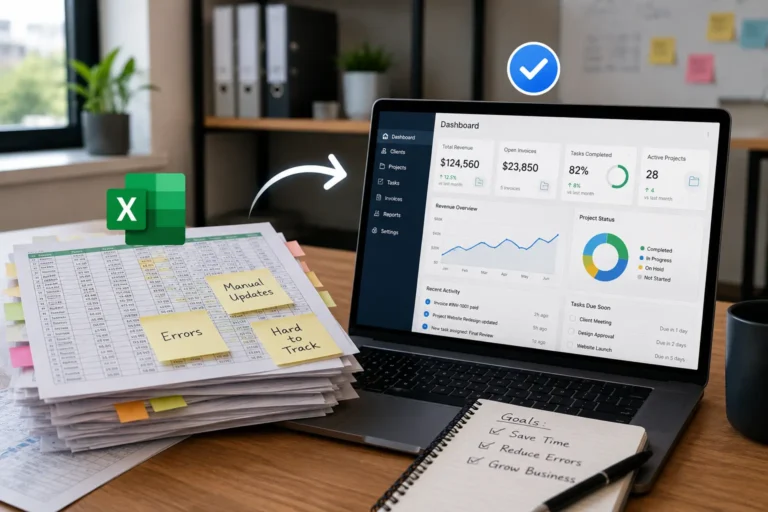
Manual Job Tracking vs Job Management Software
Manual Job Tracking
• quotes created manually
• scheduling handled through calls or messages
• job updates tracked in separate files
• invoicing delayed by paperwork
Job Management Software
• quotes generated instantly
• scheduling managed in one dashboard
• real-time job progress tracking
• invoices created automatically
Wrapping Up
Managing a job from quote to completion doesn’t have to feel chaotic. When you have the right tools in place, you can streamline every stage saving time, improving communication, and keeping your business running like a machine.
MyBusinessPortal.cloud is the all-in-one business management software built for contractors, tradesmen, and small field teams. From quoting and scheduling to task tracking and invoicing, it helps you manage every job the smart way from the very first quote to the final handshake.
Work cleaner. Work faster. Work smarter with MyBusinessPortal.cloud.
Frequently Asked Questions
What is quote-to-completion job management?
Quote-to-completion job management is the process of handling every stage of a service job — from the initial customer estimate through scheduling, work execution, and final invoice — within a single connected system. For contractors and tradesmen, managing this workflow in one platform eliminates the missed details, scheduling gaps, and delayed billing that happen when each stage runs through separate tools or manual processes.
Why do field service businesses lose money without a job management system?
When quoting, scheduling, and invoicing are handled through separate tools, problems compound quickly. Quotes get lost, schedules change without updates, and invoicing gets delayed. Each gap costs time and money — and the cumulative effect on cash flow and client relationships is significant.
What is the difference between job management software and general project management software?
General project management tools like Asana, Monday.com, and Trello are built for office-based teams handling tasks, deadlines, and collaboration. They don’t handle the operational reality of field service work — quoting, crew scheduling, job site tracking, client invoicing, and payment collection are either absent or require heavy customization. Job management software is purpose-built for contractors and field teams, connecting the full job lifecycle in a single platform designed around how field work actually operates.